淘寶店鋪裝修專(zhuān)業(yè)版950自定義寬淘寶圖片輪播代碼模板
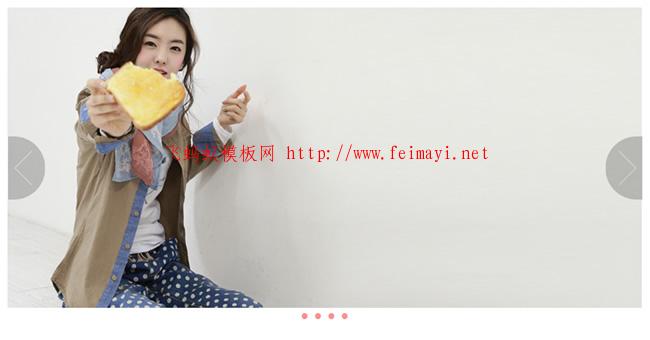
950寬淘寶圖片輪播代碼。該代碼為淘寶裝修特效代碼,默認(rèn)4張950x450海報(bào)圖片。輪播整體高度480px,輪播底部為粉紅色小點(diǎn)。
(一)效果預(yù)覽
淘寶圖片輪播代碼安裝后的裝修效果預(yù)覽截圖如下:
(二)模板修改使用說(shuō)明:
(1)該模板代碼尺寸如下:全屏輪播整套尺寸長(zhǎng)寬為950x480,海報(bào)海報(bào)圖片為950x450。簡(jiǎn)約大家制作海報(bào)圖片嚴(yán)格安裝950x450設(shè)計(jì),這樣模板代碼修改編輯后會(huì)與魚(yú)擺擺提供的演示效果一致。
代碼有兩個(gè)高度,一個(gè)是480px的輪播高度,一個(gè)是450px的海報(bào)圖片高度。如果你時(shí)間的海報(bào)不是450px,需修改模板代碼中的輪播高度和海報(bào)圖片高度(注意有30px的高度差)。建議使用記事本的查找替換功能依次替換高度。這樣不會(huì)出錯(cuò)。
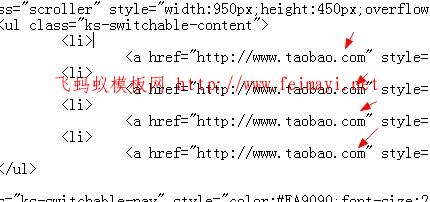
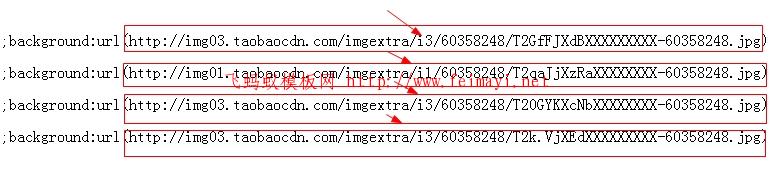
(2)海報(bào)圖片地址與寶貝鏈接地址替換說(shuō)明
下面是替換寶貝購(gòu)買(mǎi)鏈接地址的說(shuō)明截圖:
下面修改寶貝海報(bào)圖片地址的說(shuō)明指示圖片:
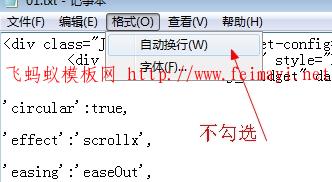
(3)修改編輯時(shí),需保證記事本配置為“不勾選 自動(dòng)換行”,否則代碼安裝到淘寶店鋪里,顯示是空白。大家一定要記住。
代碼如下:先看一下效果然后在復(fù)制粘貼進(jìn)950自定義區(qū) 就好了
<div style="margin-bottom:10px;overflow:hidden;">
	<div class="mall-slide J_TWidget slide_Psk3a" data-widget-config="{'navCls':'ks-switchable-nav','contentCls':'ks-switchable-content','steps':1,'prevBtnCls': 'prev','nextBtnCls': 'next','disableBtnCls': 'disable',

'circular':true,

'effect':'scrollx',

'easing':'bounceOut',

'duration':1.0,

'interval':'4',

'autoplay':true}" data-widget-type="Carousel" style="height:480px;">
		<div class="J_TWidget" data-widget-config="{'trigger':'.slide_Psk3a','align':{'node':'.slide_Psk3a','offset':[0,0],'points':['cc','cc']}}" data-widget-type="Popup" style="display:none;width:950px;font-size:80px;color:#FFF;font-family:宋體;">
			<span class="prev J_TWidget" data-widget-config="{'png':true,'png_bg':true}" data-widget-type="Compatible" style="cursor:pointer;float:left;display:block;width:55px;height:95px;background:url(http://img01.taobaocdn.com/imgextra/i1/60358248/T27FVbXCNaXXXXXXXX-60358248.png) no-repeat;"></span> <span class="next J_TWidget" data-widget-config="{'png':true,'png_bg':true}" data-widget-type="Compatible" style="cursor:pointer;float:right;display:block;width:55px;height:95px;background:url(http://img04.taobaocdn.com/imgextra/i4/60358248/T2c0LjXnBbXXXXXXXX-60358248.png) no-repeat;"></span></div>
		<div class="scroller" style="width:950px;height:450px;overflow:hidden;">
			<ul class="ks-switchable-content">
				<li>
					<a href="http://www.taobao.com" style="display:block;cursor:pointer;width:950px;height:450px;background:url(http://img03.taobaocdn.com/imgextra/i3/60358248/T2GfFJXdBXXXXXXXXX-60358248.jpg) no-repeat center 0;" target="_blank"></a></li>
				<li>
					<a href="http://www.taobao.com" style="display:block;cursor:pointer;width:950px;height:450px;background:url(http://img01.taobaocdn.com/imgextra/i1/60358248/T2qaJjXzRaXXXXXXXX-60358248.jpg) no-repeat center 0;" target="_blank"></a></li>
				<li>
					<a href="http://www.taobao.com" style="display:block;cursor:pointer;width:950px;height:450px;background:url(http://img03.taobaocdn.com/imgextra/i3/60358248/T20GYKXcNbXXXXXXXX-60358248.jpg) no-repeat center 0;" target="_blank"></a></li>
				<li>
					<a href="http://www.taobao.com" style="display:block;cursor:pointer;width:950px;height:450px;background:url(http://img03.taobaocdn.com/imgextra/i3/60358248/T2k.VjXEdXXXXXXXXX-60358248.jpg) no-repeat center 0;" target="_blank"></a></li>
			</ul>
		</div>
		<ul class="ks-switchable-nav" style="color:#FA9090;font-size:20px;font-family:tahoma;margin-left:435px;">
			<li style="width:20px;height:20px;line-height:20px;text-align:center;float:left;cursor:pointer;">
				●</li>
			<li style="width:20px;height:20px;line-height:20px;text-align:center;float:left;cursor:pointer;">
				●</li>
			<li style="width:20px;height:20px;line-height:20px;text-align:center;float:left;cursor:pointer;">
				●</li>
			<li style="width:20px;height:20px;line-height:20px;text-align:center;float:left;cursor:pointer;">
				●</li>
		</ul>
	</div>
</div>
