淘寶專業(yè)版旺鋪底部代碼模板頁(yè)尾css自定義代碼模板淺棕色
注意是專業(yè)版才能用,基礎(chǔ)版的請(qǐng)?zhí)^(guò)!
以下是效果圖:
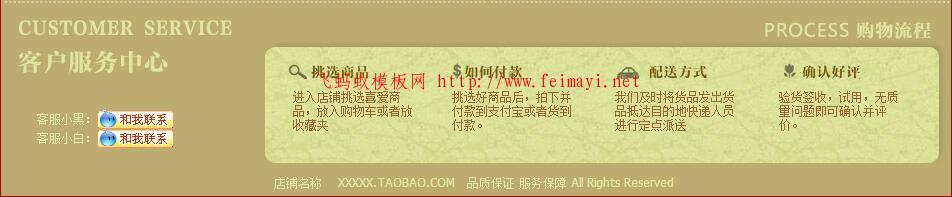
下面是代碼:可先點(diǎn)運(yùn)行代碼查看效果,然后在復(fù)制,還有復(fù)制完之后,會(huì)自動(dòng)加本站連接,在粘貼代碼的時(shí)候,記得去掉喔!
<table background="//gdp.alicdn.com/imgextra/i4/T2u880XhhbXXXXXXXX-21554113.jpg" border="0" height="196" width="950" cellpadding="0" cellspacing="0"> <tbody> <tr> <td rowspan="3" height="196" width="36"> </td> <td height="89" width="165"> </td> <td height="71" width="90"> </td> <td height="89" width="112"> </td> <td height="71" width="38"> </td> <td height="89" width="123"> </td> <td height="71" width="39"> </td> <td height="89" width="129"> </td> <td height="71" width="34"> </td> <td height="89" width="128"> </td> <td rowspan="3" height="196" width="40"> </td> </tr> <tr> <td height="80" width="165"> <font color="#e2e7a5">客服小黑:<img src="//gdp.alicdn.com/imgextra/i3/T2pvVVXktbXXXXXXXX-21554113.gif" data-cke-saved-="" border="0" height="19" width="77" /> </font> <p><font color="#e2e7a5">客服小白:</font><font color="#ffffff"><img src="//gdp.alicdn.com/imgextra/i3/T2pvVVXktbXXXXXXXX-21554113.gif" data-cke-saved-="" border="0" height="19" width="77" /></font></p> </td> <td height="69" width="90"> </td> <td height="80" valign="top" width="120"> <font color="#996633">進(jìn)入店鋪挑選喜愛商品,放入購(gòu)物車或者放收藏夾</font> </td> <td height="69" width="38"> </td> <td height="80" valign="top" width="120"> <font color="#996633">挑選好商品后,拍下并付款到支付寶或者貨到付款。</font> </td> <td height="69" width="39"> </td> <td height="80" valign="top" width="120"> <font color="#996633">我們及時(shí)將貨品發(fā)出貨品抵達(dá)目的地快遞人員進(jìn)行定點(diǎn)派送</font> </td> <td height="69" width="34"> </td> <td height="80" valign="top" width="120"> <font color="#996633">驗(yàn)貨簽收,試用,無(wú)質(zhì)量問(wèn)題即可確認(rèn)并評(píng)價(jià)。</font> </td> </tr> <tr> <td colspan="9" height="27" width="858"> <p align="center"><font color="#e2e7a5">店鋪名稱 XXXXX.TAOBAO.COM 品質(zhì)保證 服務(wù)保障 All Rights Reserved</font></p> </td> </tr> </tbody> </table>
在代碼模式下操作,不懂的可以聯(lián)系站長(zhǎng),點(diǎn)網(wǎng)頁(yè)右下角有聯(lián)系方式。